


Best Desk Shelf Riser for Monitor (2026)
This article contains affiliate links. If you purchase through these links, we may earn a small commission at no extra cost to you.
The SimpleHouseware Metal Desk Monitor Stand Riser with Organizer Drawer is the pick for most people: metal frame, a real storage drawer, and a wide platform for under $26. This guide is for anyone stuck choosing between five options that all claim to be "sturdy" and "stylish" — words that do exactly zero work when you're deciding whether your $400 monitor will wobble every time you type.
What actually matters in a monitor riser
1. Platform dimensions (not just "fits monitors up to X inches")
Manufacturers love quoting diagonal screen size compatibility. Ignore it. What matters is whether the riser's surface length is longer than your monitor's base footprint. A 24-inch monitor can have a base as wide as 22 inches. If the riser platform is only 21 inches, your monitor sits with the base hanging off the edge — which is a stability disaster, not a "minor fit issue."
Check the platform length in inches before you order. This is the single most common complaint in one-star reviews across this category.
2. Weight capacity with real headroom
Most risers in the sub-$30 tier list 22–33 lbs capacity. A single 27-inch monitor typically weighs 10–14 lbs without the stand, but with the stand and any peripherals you stack underneath, you want at least 2× overhead. If a riser is rated 22 lbs and you're putting a 14-lb monitor plus a keyboard underneath, you're already thinking about this wrong — the keyboard sits under the riser, but the monitor sits on it. Know your monitor's total weight with stand.
3. Wobble: the deal-breaker spec sheets won't tell you
No manufacturer publishes wobble ratings. Owner reviews do. The failure modes are consistent: (a) cheap rubber feet that compress and tilt over weeks, (b) hollow plastic legs that flex under a heavy display, and (c) poorly welded metal joints. Filter reviews to 1–2 stars and search "wobble," "shake," and "tipping." If you see more than a dozen, believe them.
4. Storage utility vs. storage theater
A drawer that fits a box of paperclips is not a drawer. Before buying anything with storage claims, look for owner photos showing what actually fits. The best risers in this tier will fit a keyboard underneath (clearance ~3.5–4 inches) and have a drawer deep enough for pens, small notebooks, or cables — not just business cards.
5. Assembly time and hardware quality
Several risers in this space require 20–40 minutes of tool-based assembly. That's fine if the result is rock-solid. It's not fine if the included Allen wrench strips bolt heads after one use, which is a recurring complaint in the Safco category. Check whether the frame ships pre-assembled or requires joining multiple panels under tension.
Comparison table
| Product | Platform (L × D) | Weight Capacity | Storage | Typical Price | Price per lb capacity |
|---|---|---|---|---|---|
| EVOOMI Monitor Stand Riser | ~23.6" × 9.3" | ~22 lbs | None | ~$9.99 | ~$0.45/lb |
| WALI Dual Monitor Stand Riser | ~23.6" × 9.4" | ~33 lbs | Minimal | ~$19.49 | ~$0.59/lb |
| SimpleHouseware Metal Riser w/ Drawer | ~24" × 9.1" | ~33 lbs | Drawer + shelf | ~$25.97 | ~$0.79/lb |
| Safco Onyx Mesh Monitor Stand | ~19.5" × 11.5" | ~50 lbs | Mesh shelf | ~$82.69 | ~$1.65/lb |
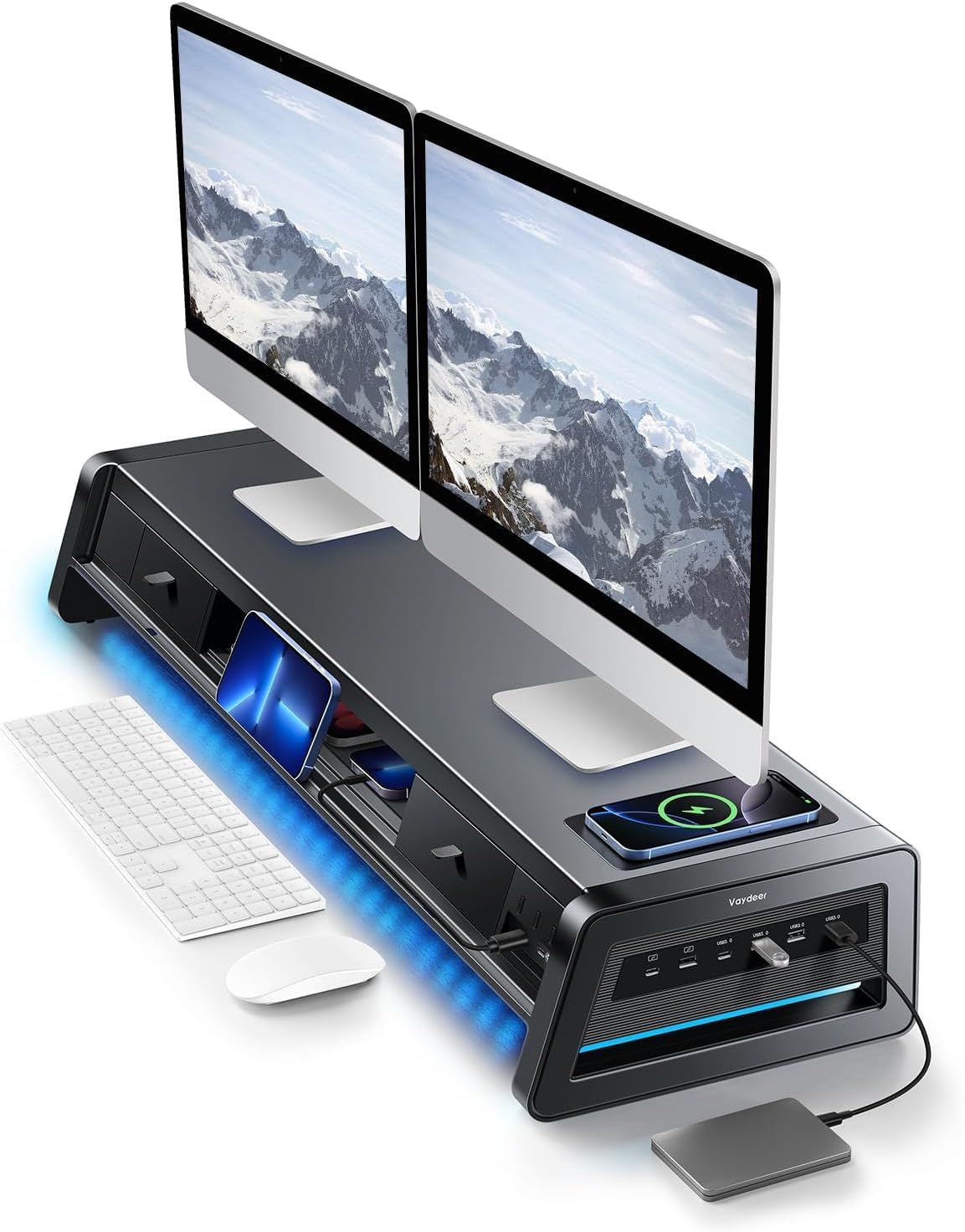
| Vaydeer All-in-One Dual Monitor Riser | ~39.4" × 11.8" | ~44 lbs (est.) | Full hub + cable mgmt | ~$170.99 | ~$3.89/lb |
Price per lb of rated capacity is the derived cross-product metric here. It rewards genuine structural value and penalizes the risers that charge a premium for branding or aesthetics without proportional load rating. The SimpleHouseware is the efficiency sweet spot. The Vaydeer's high figure is explained by its dual-monitor span and integrated hub — the cost isn't the steel, it's the ecosystem.
Platform dimensions sourced from manufacturer spec sheets. Weight capacities as listed by manufacturers. Typical prices as of June 2026 — expect drift.
The picks
EVOOMI Monitor Stand Riser — Best Budget
Under $10 is an absurdly low price for a monitor riser, and the 4.8-star average across 5,574 reviews suggests it isn't a disaster. The expectations have to be calibrated accordingly: this is a lightweight acrylic/bamboo-style riser for a single monitor under 22 lbs, not a workhorse platform.
Best for: first-time remote workers furnishing a home office on a tight budget, or anyone who just wants their laptop elevated a few inches without spending real money.
WALI Dual Monitor Stand Riser — Best Mid-Range Step-Up
The WALI has a massive review base (15,591 reviews, 4.7 stars) and a higher weight rating than the EVOOMI. The "dual monitor" label refers to side-by-side placement on the same platform — this is not a split-arm stand. The extra 11 lbs of rated capacity over the EVOOMI makes a real difference if your monitor is on the heavier side.
Best for: buyers with one larger or heavier monitor who want slightly more confidence in the platform without jumping to the SimpleHouseware's price tier.
SimpleHouseware Metal Desk Monitor Stand Riser with Organizer Drawer — Best Overall
Metal frame, pull-out drawer, keyboard clearance underneath, and the largest review base in this roundup at 25,575 ratings. The combination of a real drawer (not a mesh catchall) and steel construction at under $26 is hard to beat. Published expert roundups in the home office category consistently land on this or something near-identical as the value pick.
Best for: anyone who wants a single upgrade that improves monitor height, clears desk clutter, and doesn't require a spreadsheet to justify the spend.
Safco Onyx Mesh Monitor Stand — Best for Heavy Monitors
The Safco is a different category of product — commercial-grade, 50-lb rated, with a mesh construction that passes for professional in an office or video-call background. The catch: only 7 reviews at this price point (~$82), which is an uncomfortably thin evidence base. The platform is also shorter in length (roughly 19.5 inches) than competitors at lower prices, which matters for wide monitor bases.
Best for: buyers with a heavy ultrawide or dual-screen setup where the 50-lb capacity is genuinely required, and who want something that looks at home in a formal office environment.
Vaydeer All-in-One Dual Monitor Stand Riser — Best for Dual-Monitor Desks
At roughly 39.4 inches wide, the Vaydeer is the only pick here built from the ground up for two monitors side by side — not one platform that technically fits two if you squeeze. The "all-in-one" claim refers to integrated USB hub functionality and cable management channels. At ~$171, you're paying for the span and the ecosystem, not just the steel.
Best for: dual-monitor setups where cable chaos is the actual problem, and where a single structured solution is worth paying for over two separate risers and a separate hub.
Decision framework
Pick the SimpleHouseware Metal Riser if you have one monitor (or two smaller ones), want storage, and are buying this with a roughly $26 ceiling. It's the answer for 70% of readers.
Pick the EVOOMI if you're outfitting a secondary desk or genuinely cannot spend more than $10 — just verify your monitor weighs under 18 lbs with stand.
Pick the WALI if the EVOOMI's weight rating makes you nervous but you don't need a drawer and want to stay under $20.
Pick the Vaydeer if you're running two monitors, currently managing three separate USB hubs and a tangle of cables, and you've already accepted this is a $170 problem.
Pick the Safco Onyx if your monitor rig is genuinely heavy (think 40+ lbs combined) and the mesh aesthetic is a requirement — just know you're buying on thin review evidence.
Skip this category entirely if you already have a monitor arm — get the geometry right there rather than shimming with a riser.
How we chose
The shortlist was built by reviewing manufacturer spec sheets for platform dimensions, weight capacity, and materials, then cross-referencing owner feedback on Amazon (filtered to 1–3 star reviews and searched for "wobble," "tipping," "drawer," and "assembly") and relevant threads on r/homeoffice and r/battlestations. Published expert roundups from home office–focused outlets were used to validate the shortlist against options we may have missed. Nine products were researched before cutting to five. Primary decision criteria in order: stability under load (owner-reported), platform dimensions vs. real monitor base widths, storage utility, weight capacity with headroom, and price-to-capacity efficiency. Products requiring tool-based assembly were flagged for assembly time concerns.
FAQ
Will a monitor riser work with an ultrawide monitor?
Only if the platform length exceeds your monitor's base width — not its screen diagonal. Many ultrawides have bases 24–28 inches wide. The Vaydeer at ~39.4 inches handles this; most budget risers top out around 23–24 inches. Measure your base footprint before ordering anything in the sub-$30 tier.
Can I put my keyboard under the riser?
Most risers in this roundup offer roughly 3.5–4 inches of clearance underneath. Standard full-size keyboards clear this; tenkeyless keyboards clear it more comfortably. Mechanical keyboards with tall cases may not fit. Check the listed height (not platform height — the leg/foot height) against your keyboard's profile.
Is there a wobble risk with metal risers vs. plastic?
Metal frames generally wobble less than hollow plastic legs under load, but the weak point is usually the feet, not the material. Cheap rubber feet compress unevenly over months. Owner reports suggest the SimpleHouseware holds up well here; the EVOOMI gets more mixed long-term reports. If wobble is your primary concern, the Safco's weight and build are overkill-but-reliable.
Do any of these risers have height adjustment?
None of the five picks here are height-adjustable. They provide a fixed elevation — typically 4–5 inches. If you need variable height, you're looking at a different product category: adjustable monitor arms or stepped riser sets. A fixed riser is the right tool if your current monitor height is simply too low; it's the wrong tool if you need to fine-tune positioning.
Bottom line
For most single-monitor desks, the SimpleHouseware Metal Desk Monitor Stand Riser with Organizer Drawer is the obvious call — metal construction, an actual storage drawer, and a price that makes overthinking this feel silly. Budget-constrained buyers should grab the EVOOMI Monitor Stand Riser without guilt as long as the monitor is on the lighter side. Anyone running two monitors and drowning in cables should look seriously at the Vaydeer All-in-One Dual Monitor Stand Riser — it's expensive, but it's solving a real problem that two cheap risers and a USB hub can't solve cleanly. The WALI splits the difference between the first two for anyone weight-limited but price-sensitive. The Safco Onyx earns its place only if you need that 50-lb capacity or the professional aesthetic is non-negotiable.