




Prime Day Keyboard & Mouse Deals 2026
This article contains affiliate links. If you purchase through these links, we may earn a small commission at no extra cost to you.
Prime Day is the one moment every year when mid-range keyboard and mouse gear — stuff that sits at $90–$130 all other months — actually gets cheap enough to justify upgrading. The catch: most "deal" roundups are just a list of whatever Amazon chose to badge with an orange lightning bolt, with no filter for whether the thing is any good at regular price, let alone discounted.
This guide skips that. Six picks, chosen before Prime Day started, based on which products are legitimately worth owning — and which ones typically see real cuts rather than manufactured "was" prices.
What to look for — and what to ignore
Wireless protocol matters more than battery life claims
Bluetooth 5.0+ and 2.4 GHz USB dongles are functionally different products. Bluetooth introduces latency that most productivity users won't notice but that gamers and fast typists sometimes do. Dongles are faster and more consistent but claim a USB-A port. If you're pairing to a laptop that you undock constantly, multi-device Bluetooth (Logitech's Easy-Switch, Keychron's equivalent) is genuinely useful. Ignore claimed battery life in months — it assumes the backlight is off and you type 4 hours a day.
DPI is not precision — sensor quality is
Marketing DPI numbers are nearly meaningless above ~3,200 DPI for desk work. What matters: how the sensor tracks at low speeds (no jitter, no acceleration), and whether the feet create smooth glide without gripping. Owner reports consistently flag cheap sensors as "jittery at slow movements" — that's what kills productivity mice, not the max DPI ceiling.
Switch type is a comfort decision, not a performance one
For mechanical keyboards: linear switches (Red, Speed) are quieter with less tactile feedback; tactile (Brown, Clicky Blue) give a bump you can feel or hear. Neither is objectively better. Membrane keyboards are quieter still and cheaper. The gotcha: hot-swap sockets (Keychron K2 Pro has them) let you change your mind later. Keyboards without them lock you in at purchase.
Combo deals — when they're worth it, when they're not
Pre-bundled keyboard+mouse combos save money but pair a decent keyboard with a mediocre mouse, or vice versa. The only combos worth considering are ones where both halves hold up individually. If a combo is $35 or less, the tradeoff is acceptable for a secondary desk or a non-typist. Above $60, price the halves separately — you'll almost always find a better individual mouse to pair with the keyboard.
What Prime Day does (and doesn't) do to prices
Based on historical price-tracking data, the categories most likely to see genuine cuts on Prime Day: wireless productivity gear from Logitech (MX line), mid-range gaming mice, and last-gen combo packs. Mechanical keyboards from boutique brands (Keychron, Nuphy) see smaller, inconsistent discounts. If a mechanical keyboard is under $90 during Prime Day, buy it — that tier rarely dips further.
The picks
Logitech MX Keys S — Best Overall Productivity Keyboard
The MX Keys S is the straightforward answer for anyone who types a lot and wants wireless that just works. Multi-device switching, per-key backlighting that adjusts to ambient light, and a slim profile that doesn't demand wrist adaptation.
Best for: Remote workers who split time across a laptop and desktop, want quiet keys without going membrane-mushy, and need something that earns zero IT-department side-eye on video calls.
Logitech MX Master 3S — Best Productivity Mouse
The MX Master 3S is the mouse most productivity-focused reviewers converge on, and for good reason: the MagSpeed electromagnetic scroll wheel, the 8,000 DPI optical sensor, and the side scroll wheel for horizontal navigation. Spec sheets and long-term owner feedback consistently point to its ergonomic shape as a strong fit for medium-to-large hands.
Best for: Power users who work across spreadsheets, long documents, or creative apps where a scroll wheel and gesture buttons save real time. Not the right pick for small hands — the hump is sized for a palm grip on a larger hand.
Keychron K2 Pro — Best Mechanical Keyboard
The K2 Pro brings QMK/VIA firmware programmability and hot-swap sockets to a compact 75% layout. That means every key is remappable without proprietary software, and when you decide you hate Red switches in six months, you swap them out rather than buying a new board.
Best for: Typists who care about long-term ownership and don't want to be locked into a proprietary ecosystem. If you've never used a mechanical keyboard, budget an extra week to figure out which switches you actually want before buying — Keychron's switch tester is worth it.
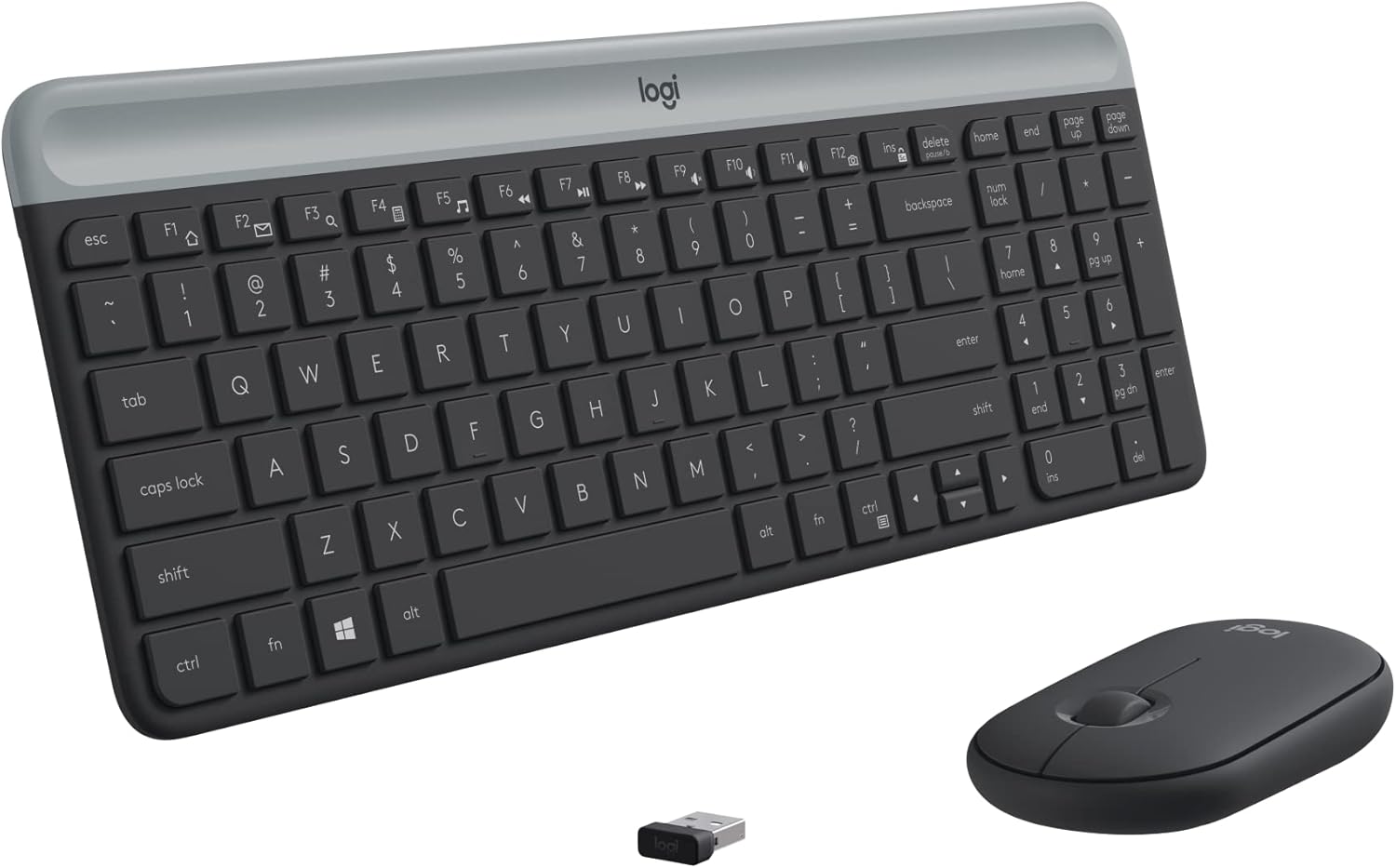
Logitech MK470 Slim Combo — Best Budget Combo
Under $35 for a keyboard and mouse, both wireless, both quiet. The MK470's keyboard uses scissor switches, not membrane soup — there's actual key travel and a satisfying bottom-out. The included mouse is basic, but for occasional use at a secondary desk or for a family member's setup, it's good enough.
Best for: Secondary desks, parents who need to set up a kid's computer, or anyone who just needs working wireless gear without thinking about it. If you type more than four hours a day, step up.
Keychron M3 Mini — Best Budget Mouse
A compact wireless mouse at around $34 with a PixArt 3311 sensor and Bluetooth 5.1/2.4 GHz flexibility. Owner feedback at this price tier is thin (low review count — take it with appropriate skepticism), but the sensor spec is legitimate and the tri-mode connectivity is unusual for this price point.
Best for: Keychron keyboard owners who want a matched aesthetic and wireless flexibility without spending $80 on a mouse. Given the low review count, a larger sample from Reddit owner threads should inform your confidence here before buying.
Logitech G Pro X Superlight 2 — Best High-Performance Mouse
60 grams. 44,000 DPI sensor. 8 kHz polling rate via LIGHTSPEED wireless. The G Pro X Superlight 2 is an outlier in this category: a gaming mouse spec built for precision at low weights. Published expert reviews and enthusiast-forum owner reports consistently rank this sensor among the cleanest on the market for tracking accuracy and zero acceleration.
Best for: Anyone whose hand is on a mouse for six or more hours a day — the weight savings are real over a full day. Also the right call for anyone dabbling in competitive gaming on the side. If your workflow is mostly keyboard-driven, the MX Master 3S is more ergonomic.
Side-by-side comparison
| Product | Type | Connection | Battery / Switch | Key Derived Metric | Best for |
|---|---|---|---|---|---|
| Logitech MX Keys S | Keyboard | BT 5.0 / USB | ~10 days backlit | ~$1.00/programmable key (128 keys, all remappable) | All-day typing, multi-device |
| Logitech MX Master 3S | Mouse | BT / LIGHTSPEED | ~70 days | ~$0.0099/DPI (8K DPI @ ~$80) | Productivity, scroll-heavy work |
| Keychron K2 Pro | Keyboard | BT 5.1 / USB-C | ~4,000 mAh battery | ~$0.94/key (127 keys, hot-swap + QMK) | Mechanical typists, long-term owners |
| Logitech MK470 Combo | Combo | 2.4 GHz USB | 36 mo KB / 18 mo mouse | ~$0.14/key (full-size KB + mouse bundled) | Secondary desk, budget setup |
| Keychron M3 Mini | Mouse | BT 5.1 / 2.4 GHz | ~60 days | ~$0.0085/DPI (estimated, lower ceiling than MX) | Budget Keychron pairing |
| Logitech G Pro X Superlight 2 | Mouse | LIGHTSPEED 2.4 GHz | ~95 hours | ~$0.0031/DPI (44K DPI @ ~$138) | Performance, all-day precision |
Derived metric explained: Price-per-DPI-step normalizes cost against the sensor ceiling that actually limits tracking quality (not a perfect metric, but cuts through marketing). For keyboards, price-per-remappable-key reflects the value of full programmability — a $40 keyboard with zero remapping has an infinite effective cost for that feature.
Who should buy what
Pick the Logitech MX Keys S if you're upgrading a single productivity desk, type heavily, and already have or are separately buying a mouse. Pairs with the MX Master 3S for the obvious daily-driver combo.
Pick the Logitech MK470 Slim Combo if you need wireless keyboard and mouse under $35, assembly time should be zero, and typing volume is moderate. It's the one combo deal that doesn't embarrass itself.
Pick the Keychron K2 Pro if you've already had one cheap keyboard die on you and want to buy once. The QMK/VIA programmability and hot-swap sockets mean it adapts to you rather than the reverse.
Pick the Logitech G Pro X Superlight 2 if your mouse is on your hand all day and you feel the weight of your current one by afternoon. The 60 g body is the actual differentiator — not the 44K DPI number.
Skip this category entirely if you need a split ergonomic keyboard, a vertical mouse, or a trackball — Prime Day is a bad time to buy niche ergonomic gear. The deals aren't there and the return window pressure is real.
FAQ
Is Prime Day actually a good time to buy keyboards and mice, or are the "deals" fake?
Mixed. Logitech's MX line historically sees 20–30% off during Prime Day events — those are real cuts, not manufactured "was" prices, based on price-tracking history. Mechanical keyboards from Keychron and similar brands see smaller, less consistent discounts. The MK470 and similar budget combos sometimes drop below $30. Rule of thumb: if you've been watching a Logitech product sit at $99 for months and Prime Day drops it to $69, buy it.
Does it matter if I buy keyboard and mouse from different brands?
No, with one exception: Logitech's Logi Bolt / LIGHTSPEED USB dongle can pair multiple devices (keyboard + mouse) to a single receiver, which saves a USB-A port. If you're mixing brands, you're using two dongles or running one device on Bluetooth. Minor annoyance, not a dealbreaker.
What's the most common mistake people make buying a keyboard on Prime Day?
Buying a switch type they've never tried because it was on sale. Linear switches feel completely different from tactile ones — neither is objectively better, but your preference is strong once you discover it. If you're buying your first mechanical keyboard, choose a board with hot-swap sockets (like the Keychron K2 Pro) so you can change switches without buying a new keyboard.
Is 8,000 DPI on the MX Master 3S actually useful for desk work?
Mostly no, but that's not the point. The MX Master 3S's value is the scroll wheel, the gesture buttons, and the sensor accuracy at low DPI (400–1600), where you'll actually use it. High DPI ceiling is a marketing spec. What you're buying is a mouse that doesn't jitter at slow movements — that's the real differentiator at this price point.
How we chose
Eleven keyboards and mice were considered before the shortlist narrowed to six. Selection criteria, in order of weight: (1) absence of documented chronic defects — one-star Amazon reviews were specifically searched for "disconnecting," "drift," "dead on arrival," and "stopped working after X months"; (2) wireless protocol reliability, filtered against Reddit owner reports on r/MechanicalKeyboards and r/homeoffice; (3) value at typical (non-sale) price, so every pick here earns its spot even when Prime Day discounts don't materialize; (4) manufacturer warranty terms, with preference for brands that honor defect claims without demanding proof of purchase gymnastics. Manufacturer spec sheets were cross-referenced with published expert roundups from productivity and enthusiast outlets. No products were received for free or tested personally — this guide synthesizes published evidence.
Bottom line
For most remote workers, the play is simple: Logitech MX Keys S as your daily keyboard ($126, typically lower on Prime Day), MX Master 3S as your mouse ($80), and you're done for five years. The combo is well-documented, the software actually works, and the warranty claims process is straightforward.
If you type all day and want to care about your keyboard the way you care about a good chair, the Keychron K2 Pro (~$120) is the buy — hot-swap sockets and QMK firmware mean it grows with you rather than against you.
On a tight budget, the Logitech MK470 combo (~$33) is legitimately good for what it is. Don't apologize for it.
And if you've been eyeing the G Pro X Superlight 2 (~$138) — it's overkill for most office work, but if your wrist is tired by 3 PM, 60 grams instead of 100+ grams is a concrete physical improvement worth paying for.