

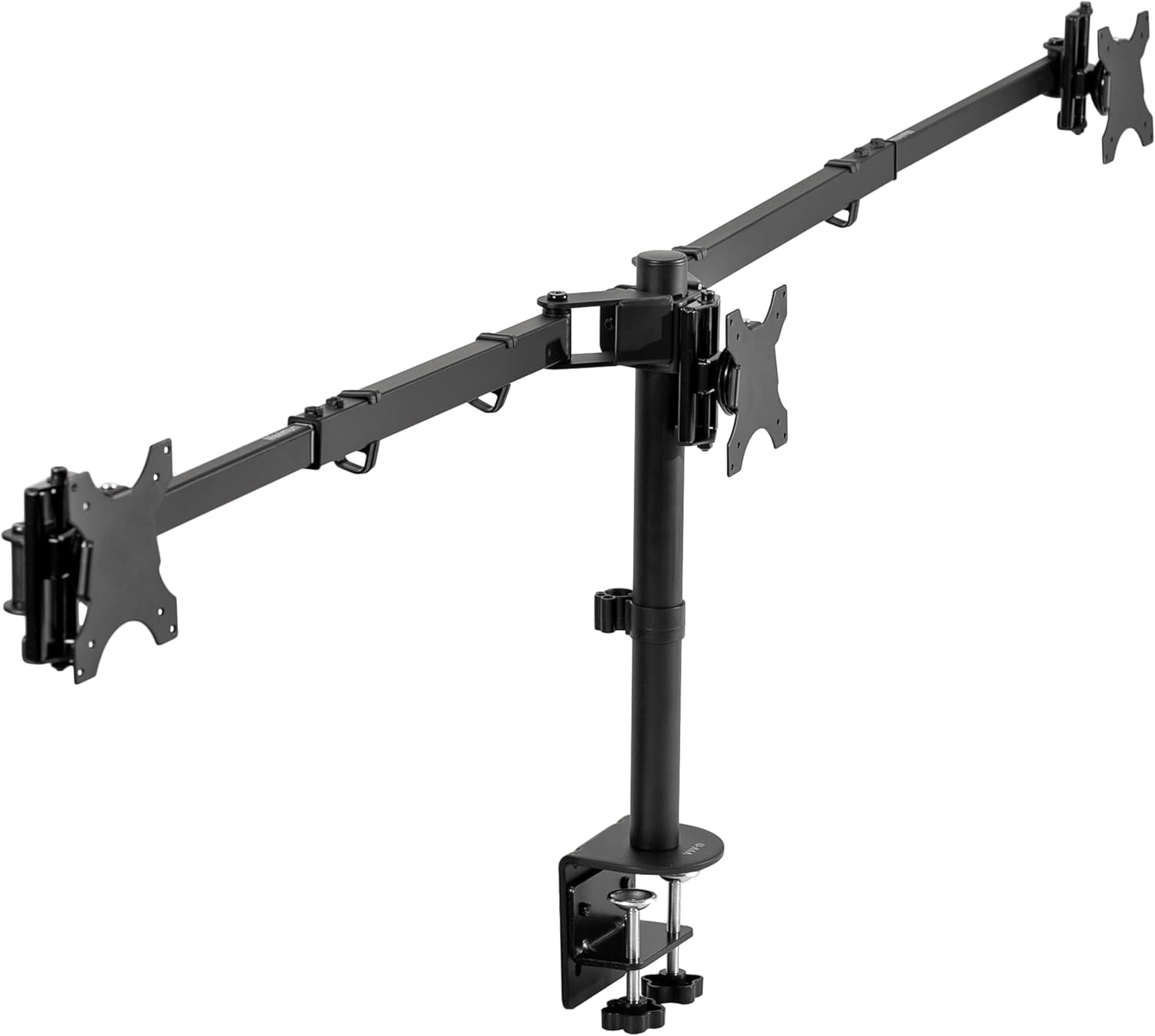


Best Monitor Arm for Three Monitors (2026)
This article contains affiliate links. If you purchase through these links, we may earn a small commission at no extra cost to you.
Three monitors. One desk. The problem isn't finding a mount — there are dozens of them. The problem is that most of them are exactly what the $40 price tag implies: flimsy stamped-steel joints that sag within six months, clamping systems that mar your desk, and weight limits that don't account for the fact that most buyers are running 27-inch panels that push 10–14 lbs each.
This guide cuts through the noise. Five products made the shortlist. Every one of them is worth discussing; not all of them are worth buying for your specific situation.
What to look for in a triple monitor arm
Joint mechanism: gas-lift vs. spring-tension vs. fixed
This is the spec that predicts longevity more than anything else. Gas-lift arms (common on higher-end Ergotron and Humanscale products) hold their position with a sealed gas cylinder — they resist drift without tightening a friction knob. Spring-tension arms (most budget triple mounts) use a coiled spring that gradually loses tension. Fixed joints have no up-down tilt at the arm itself, only at the head; they're stiff but stable.
Budget triple arms almost universally use spring-tension or friction mechanisms. Owner reports consistently show joint drift showing up at the 6–18 month mark. Factor that in before celebrating a $40 price tag.
Weight capacity — and whether the spec is honest
Manufacturers quote total capacity or per-arm capacity, and they often don't specify which. A mount rated "33 lbs total" for three arms gives you roughly 11 lbs per monitor. A 27-inch IPS panel typically runs 9–14 lbs without the stand. That's tight clearance.
Always check per-arm capacity, not the aggregate. If the listing only gives you the total, divide by three and compare it to your monitor's listed weight — then add a 20% buffer for safe long-term joint performance. Spec sheets and long-term user feedback consistently point to overloading as the primary cause of premature joint failure in this category.
Desk clamp vs. grommet mount
Most triple arms ship with both. What the listing won't tell you: clamps require a desk edge with enough clearance (typically 3–4 inches of flat surface) and a top thickness they can actually grip (typically ¾ inch to 3 inches). Thick wooden desks or desks with integrated cable trays can make clamping unreliable.
Grommet mounting is more stable for heavy loads — but you need a pre-drilled hole or you're drilling one yourself. Check before you order.
Pole diameter and arm reach
On triple mounts, all three arms share a single vertical pole. Pole diameter affects rigidity: thicker poles (35 mm+) wobble less under load than thinner 25–28 mm poles, especially when two arms are extended horizontally and one is sitting high. Arm reach (from pole to VESA plate) also determines how far apart your monitors can sit. Under-specified reach is a common complaint — particularly on budget arms that max out at 13–15 inches per side.
Warranty length
Budget triple arms often come with 12-month warranties. Ergotron's standard arms carry a 10-year warranty. Humanscale products carry a similar long-form guarantee. For a mount you're bolting into your desk and trusting with several hundred dollars of monitors, warranty terms are a meaningful signal of manufacturer confidence in the product.
The picks
Best Overall — HUANUO Triple Monitor Mount
With over 7,000 reviews at 4.3 stars, the HUANUO has more real-world validation than anything else in this price tier. It's the default answer for most buyers running three 24–27 inch monitors who don't want to spend north of $150. Not for anyone running 32-inch panels near their weight ceiling.
Best for Premium Dual-of-Three Builds — Ergotron LX Dual Stacking Arm
The Ergotron LX Dual Stacking covers two monitors, not three — but it earns a spot here because a significant number of three-monitor buyers are better served by a premium dual arm paired with a separate single arm than by a cheap all-in-one triple. The 4.6 stars across 1,543 reviews and the 10-year warranty are hard to argue with. If your center monitor is a large ultrawide, this pairing approach makes even more sense.
Best Budget Triple — VIVO Premium Triple Monitor Desk Mount
VIVO's triple mount sits between the North Bayou and HUANUO on price and has a smaller review base (162 reviews, 4.2 stars) than either. Published owner reports flag assembly as complex but praise the adjustability range. Worth considering if HUANUO is out of stock and North Bayou feels too light for your monitors.
Best Ultra-Budget Option — North Bayou Triple Monitor Arm
Under $35 for a triple arm is legitimately impressive — and legitimately limited. Owner reports and Reddit threads on r/battlestations consistently recommend it for monitors in the 17–24 inch range. Go in with calibrated expectations: the joints are friction-based, not gas-lift, and the 682-review sample size is smaller than you'd want for a high-confidence buy.
Best Per-Monitor Premium Build — Humanscale M8.1 Monitor Arm
The M8.1 is a single-arm product used here as a per-monitor solution for a three-screen setup — meaning you'd purchase three of them. That brings the all-in cost above $1,350, which sounds absurd until you consider that the M8.1's weight-responsive mechanism requires zero tool adjustment, the build quality is commercial-grade, and Humanscale's warranty coverage means you're not buying again in three years. Strictly for buyers who view monitors as long-term infrastructure.
Comparison table
| Product | Monitors Covered | Typical Price | Avg Rating (Reviews) | Cost per Monitor Slot | Best for |
|---|---|---|---|---|---|
| HUANUO Triple Monitor Mount | 3 | ~$120 | 4.3★ (7,160) | ~$40 | Most buyers, 24–27" panels |
| Ergotron LX Dual Stacking Arm | 2 | ~$529 | 4.6★ (1,543) | ~$265 | Premium dual + single pairing |
| VIVO Premium Triple Monitor Desk Mount | 3 | ~$90 | 4.2★ (162) | ~$30 | Budget triple, needs patience on assembly |
| North Bayou Triple Monitor Arm | 3 | ~$35 | 4.4★ (682) | ~$12 | Ultralight monitors, temporary setups |
| Humanscale M8.1 Monitor Arm | 1 (×3) | ~$454 each | 3.8★ (34) | ~$454 | Long-term commercial workstations |
Cost per monitor slot = typical price ÷ number of monitors covered. Lower means cheaper per screen; does not reflect build quality or longevity. Prices drift — verify before purchasing.
The cost-per-slot column is the number no spec sheet gives you side-by-side. The North Bayou's $12/slot is extraordinary; the Humanscale's $454/slot is only defensible if you're buying once and keeping it for a decade.
Which one is for you
Pick the HUANUO Triple Monitor Mount if you're running three monitors in the 24–27 inch range, want full-motion arms, and don't want to spend more than $150. This is the answer for the overwhelming majority of readers.
Pick the North Bayou Triple Monitor Arm if your monitors are lightweight (under 10 lbs each), you're on a hard budget cap under $40, or this is a temporary setup you might reconfigure in a year.
Pick the Ergotron LX Dual Stacking Arm if you want the highest-confidence mount for two of your three screens and are comfortable pairing it with a separate single arm — particularly if your primary and secondary monitors are large or heavy.
Pick the Humanscale M8.1 (×3) if you're building a permanent, high-end workstation and treat monitors as infrastructure rather than consumer electronics. The per-slot cost is brutal; the build quality is not.
Skip triple monitor arms entirely if your monitors exceed 20 lbs each — at that mass, look at wall-mount solutions or heavy-duty freestanding risers instead.
FAQ
Q: The biggest mistake buyers make — what is it?
Buying for monitor size instead of monitor weight. A 27-inch monitor can weigh anywhere from 8 to 16 lbs depending on panel type, stand design, and whether there's a built-in speaker. Most budget triple arms have a per-arm limit around 11–13 lbs. Check the weight listed on your monitor's spec sheet — not the size — before ordering.
Q: Do I need three separate arms or one triple mount?
Triple mounts are cheaper and require only one desk clamp. Three separate arms give you more independent positioning, better weight distribution per clamp point, and usually higher build quality per arm. For most home office setups, a triple mount is the right call. For commercial or high-load installs, separate arms (or arm pairs) are worth the added cost and complexity.
Q: How thick does my desk need to be for clamp mounting?
Most clamps in this category handle desks from about ¾ inch up to 3 inches thick. The more specific constraint is the flat clamping surface depth — you typically need 3–4 inches of unobstructed desk edge. T-molded edges, thick aprons, and cable management channels along the edge are common deal-breakers. When in doubt, go grommet.
Q: Is wobble inevitable on triple monitor arms?
Not inevitable, but common — especially on single-pole designs where all three arms cantilever off one anchor point. Wobble is most pronounced when arms are fully extended horizontally and the pole diameter is thin (under 30 mm). Tightening the base clamp and using the minimum necessary arm extension reduces it. If your work involves video calls with a camera on a monitor, wobble is a real problem; factor that in.
How we chose
This shortlist came from evaluating nine total products — the five published here plus four runners-up (Fleximounts D3, Vari dual arm, ErGear triple, Suptek triple). Primary sources were Amazon verified owner reviews (filtered for long-form, specific complaints), Reddit threads on r/battlestations and r/homeoffice, and published roundups from established ergonomics and home office outlets. Criteria that dominated the cut: per-arm weight capacity relative to the 27-inch panel market, joint mechanism type (gas-lift over spring-tension where available), clamp and grommet quality, warranty length, and review volume as a proxy for real-world validation. Products with fewer than 100 reviews were deprioritized unless the build quality or price point was meaningfully differentiated. Price was a secondary cut variable — the North Bayou made the list not because it's great but because the budget segment has genuine buyers who deserve an honest answer about its limitations.
Bottom line
For most people building a three-monitor setup: HUANUO Triple Monitor Mount. The 7,000-plus owner reviews don't lie, the full-motion arms cover standard 24–27 inch panels, and the ~$120 price leaves budget for the monitors themselves. If $120 is still too much, the North Bayou Triple Monitor Arm is a real product that works — provided your monitors are light and your expectations are calibrated.
If you want to build something you won't revisit in two years, buy three Humanscale M8.1 arms. Yes, the all-in cost is over $1,300. No, it's not for most people. But if you're pricing out a long-term home office and monitors are central to how you work every day, the M8.1's build quality and warranty terms make that number defensible.
The Ergotron LX Dual Stacking Arm is the pick for anyone who refuses to compromise on the two monitors they use most — pair it with a quality single arm for the third screen and you have a best-of-both-worlds solution that the all-in-one triples can't match.